
WMS ERP Integration Without Manual Processes
WMS ERP Integration – Synchronizing Warehouse Operations with the ERP System
With WMS ERP integration, information and the actual movement of goods remain continuously synchronized.
Real-Time Synchronization
Orders, receipts, shipments and inventory are updated automatically between ERP and WMS, without delays or manual intervention.
Flexible WMS ERP Integration
Connect Crosspoint WMS with the ERP and other existing applications through APIs, web services or automated data exchange.
Operational Automation
Eliminate manual data entry and optimize logistics workflows through continuous, secure data exchange.
≈40 active interfaces

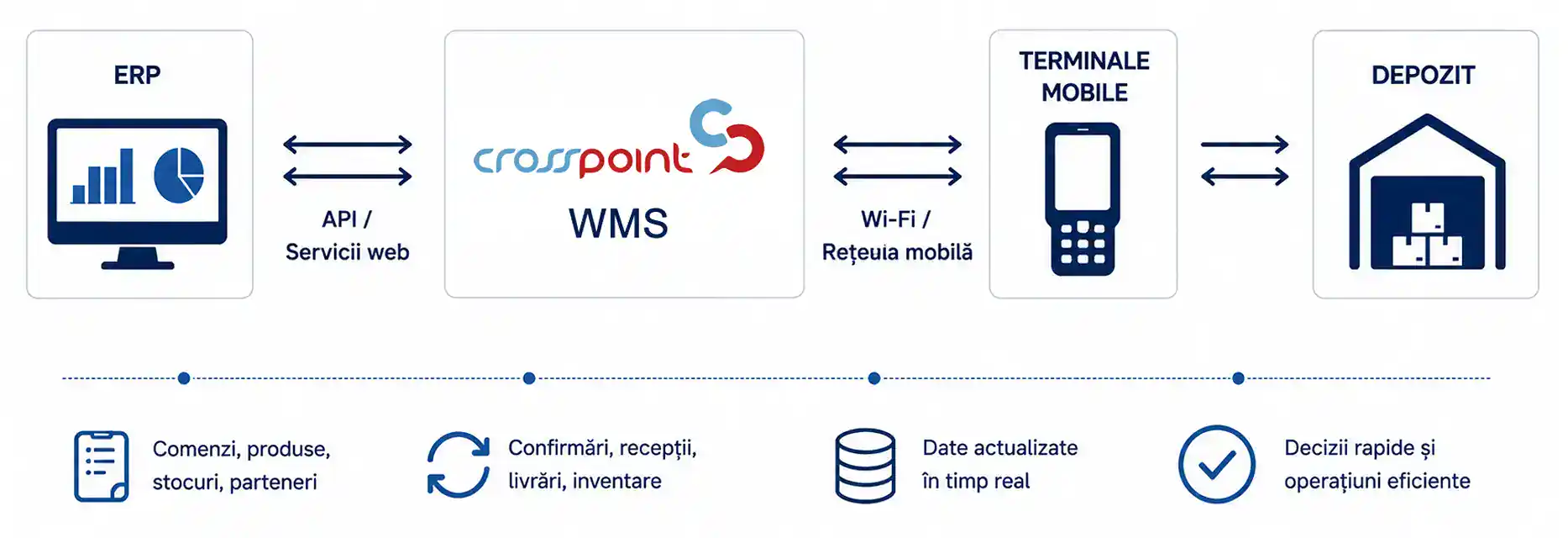
WMS ERP Integration
In any company handling significant volumes of goods, information must move quickly and accurately between departments.
As the number of orders, locations, rules and exceptions increases, automated data exchange becomes essential for reducing manual intervention and maintaining operational control.
Details
goods receiving, location allocation, picking, inventory counting and shipping.
If the two applications operate independently, users must enter the same information into multiple systems, consuming time and increasing the risk of errors. Differences between physical and system inventory, delays in updating orders and limited operational visibility are only some of the consequences.
By integrating Crosspoint WMS with the ERP system, information flows automatically between the two applications. Orders, inventory and delivery confirmations are synchronized in real time so every department works from the same up-to-date data.
How Does WMS ERP Integration Work?
WMS ERP integration means the automatic exchange of information between the two systems, without manual intervention.
Depending on the company’s infrastructure, communication can use REST APIs, web services (SOAP), automated file exchange or other integration mechanisms.
Details
- ERP sends sales orders, purchase orders and product information to Crosspoint WMS.
- WMS plans and coordinates receiving, storage and order preparation.
- Operators confirm each operation using mobile terminals and barcode scanning.
- WMS instantly updates inventory and order status.
- ERP automatically receives confirmations for receipts, shipments and inventory changes.
The entire process runs without manual data entry, reducing processing time and eliminating the risk of inconsistent information between systems.
What Information Can Be Synchronized?
Crosspoint WMS can automatically synchronize all information required for logistics operations.
Among the most important data types are:
- product master data;
- barcodes and units of measure;
Details
- customers and suppliers;
- sales orders;
- purchase orders;
- delivery notes and logistics documents;
- receipts;
- shipments;
- available inventory;
- lots and serial numbers;
- expiration-date data;
- storage locations;
- inventory counts;
- order status.
Synchronization can take place in real time or at configurable intervals, depending on company requirements and the way the existing ERP system operates.
ERP Systems Crosspoint Can Integrate With
Crosspoint WMS is designed to communicate with most ERP applications used both in Romania and internationally. Integration can be implemented through:
- REST API;
- web services (SOAP);
Details
- databases;
- automated file exchange (XML, CSV, TXT);
- other custom mechanisms.
Crosspoint can integrate with solutions such as:
- SAP;
- Microsoft Dynamics 365;
- Oracle;
- Charisma ERP;
- SeniorERP;
- ASiS ERP;
- WinMENTOR Enterprise;
- other in-house or customized ERP systems.
Thanks to its flexible architecture, integration can be adapted to existing processes without requiring major changes to the company’s IT infrastructure.
How Is WMS ERP Integration Implemented?
Implementing WMS–ERP integration follows a clearly defined process adapted to the specific requirements of each organization.

Analysis of Existing Processes

Defining the Data Exchange

Configuring the Interfaces

WMS ERP Integration Testing
Before go-live, all operational scenarios are tested to verify that data exchange works correctly.

Go-Live

Monitoring and Optimization
Benefits of WMS ERP Integration
Eliminate Manual Data Entry
Operators no longer need to copy information between applications. Orders and inventory changes are transferred automatically, reducing processing time and the risk of human error.
Real-Time Inventory Updates
ERP and WMS work with the same set of information. Management, commercial teams and warehouse staff have continuous access to the actual inventory position. According to IBM, integration between supply-chain applications enables automated data exchange and improves operational visibility.
Fewer Operational Errors
Automated data exchange eliminates discrepancies between physical and system inventory as well as errors caused by manual data entry. Microsoft explicitly describes the benefits of integrating ERP and warehouse-management solutions to automate logistics workflows.
Complete Traceability
Integration supports warehouse traceability, including lot and serial-number tracking and the complete operational history.
Higher Productivity
Operators spend less time entering data and more time on value-added activities. Logistics workflows become faster and more efficient.
Decisions Based on Up-to-Date Information
Managers can analyze performance indicators, inventory levels, orders in progress and warehouse utilization in real time, enabling faster and better-informed decisions.
For the impact across the entire logistics operation, also see the benefits of Crosspoint WMS.

WMS–ERP Data Exchange
Integration is not simply about transferring data between two applications; it also requires clearly defining which system creates, validates and updates each piece of information throughout the logistics process.
Within a Supply Chain Management ecosystem, WMS and ERP are part of a broader information flow that can include TMS, eCommerce, EDI, BI and other operational applications.
The integration between Crosspoint WMS and the ERP system is configured according to the company’s processes, existing applications and the information required by each logistics workflow. For every transaction, the transmitted data, direction of exchange and synchronization timing are defined.
Data Sent from ERP to WMS
The ERP system can send Crosspoint the information required for warehouse operations: item and partner master data, purchase and delivery orders, transfers, commercial data and other information relevant to logistics processes.
Data Sent from WMS to ERP
After physical operations are executed, Crosspoint can send confirmations and results back to ERP: received or shipped quantities, inventory changes, lots and serial numbers, inventory differences and order statuses. This keeps ERP records synchronized with the physical status of the goods.
Real-Time or Configurable-Interval Synchronization
Data exchange can take place in real time or at configurable intervals. Integration can use APIs and REST or SOAP Web services, as well as files, shared tables or other methods compatible with the existing IT infrastructure.
Transaction Validation and Monitoring
Transactions between WMS and ERP can be monitored to verify status and identify errors. Once the source information is corrected, transactions can be resumed without manually re-entering the entire workflow.
Frequently Asked Questions About WMS ERP Integration
How Is WMS ERP Integration Implemented?
Does the ERP System Need to Be Replaced?
Which ERP Systems Can Crosspoint Integrate With?
Is Inventory Updated in Real Time?
How Long Does WMS ERP Integration Take?
Can It Integrate with In-House Applications?

Without WMS ERP Integration vs. Crosspoint Integrated with ERP
See How WMS ERP Integration Can Be Implemented in Your Warehouse
Schedule a demo and see how Crosspoint WMS synchronizes orders, inventory and shipments with the ERP system.
Why Do Companies Choose Crosspoint WMS Integration?
✔ Compatible with most ERP systems used in Romania and internationally.
✔ Integration through APIs, web services or automated file exchange.
✔ Implementation adapted to existing processes without interrupting operations.
✔ Real-time inventory and order updates.
✔ Reduced processing time and elimination of manual data entry.
✔ More than 80 companies use Crosspoint WMS to manage logistics operations.